Its quite a common thing with Flex and actionscript projects to create an Object and inside that object it will have many properties.  Something in your view will be bound to the object so that the view changes with the object. So long as you change the entire object this will work fine.

Where this doesn’t work is if you change a property inside the object.

So if we have something like this

[Bindable]			
private var myObject : ObjectDataVO;
 
<view:SomeComponent
...
data="{ myObject }"
...
/>

When we set myObject to something the view component gets updated (great so far).
Lets say the myObject has a property text and the view component uses this to display some visual label, then somewhere in the app I change that property, myObject.text = “something else”;
The binding will not trigger as I haven’t actually changed the myObject, just a property inside it.

So how do we fire the binding manually? Well there is the BindingManager class (note this is an excluded class so you’ll not see it in the autocomplete ).
So in this example if I changed the myObject.text property then I could call

BindingManager.executeBindings( this, ‘myObject.text’, myObject );

This would fire of the binding as if the actual myObject had changed so anything listening in will now get updated.

Tags Tags: , , ,
Categories: actionscript, Flex, tips
Posted By: Kenneth
Last Edit: 30 Aug 2011 @ 10 08 PM

EmailPermalinkComments (2)

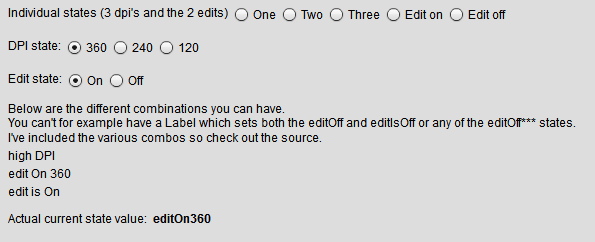
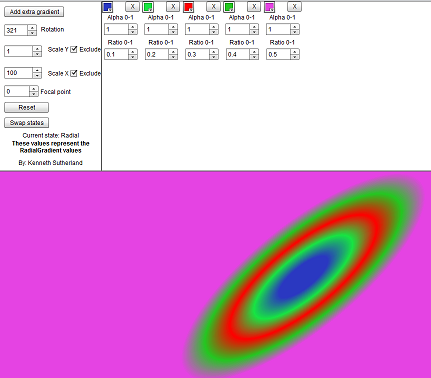
I was playing around with some code recently (Flex 4 code) and I went to create a simple background and not having Catalyst or similar to output a fxg file I went to create my own gradients with some code. After a couple of goes and not getting anything resembeling what I expect I decided to write a quick explorer.

I’ve done something similar ages ago with flex 3, so I thought I’d do this with flex 4 and perhaps look to expand it as an example of reskining an app with different skins. (source code may follow when I do this)  So here is the first step. A simple explorer to help understand the values that are used to make a Linear or Radial gradient along with the entries that make the look how they look.

I think it should be self explanatory, but if not just post a comment.

Follow the link to open the explorer.

Explorer screenshot

Tags Tags: , , , , ,
Categories: Flex, Flex 4
Posted By: Kenneth
Last Edit: 24 Feb 2011 @ 03 53 PM

EmailPermalinkComments (0)
 09 Jun 2009 @ 7:57 AM 
Question:

What has a hidden entrance, is dark, damp and a just bit fousty (for any non Scottish readers - definition ) and takes quite a while to warm up?

Answer:

SoTR09 :)
Yes, the Scotch on the Rocks 09 event held in Edinburgh was in a building called ‘The Caves’.  Oddly enough for a venue there was no sign outside to say that you were in the right place and on Friday there was a reasonable amount of rain.  So inside the main venue area you could see the water slowly runnning down the walls and the occasional drip noise coming from the corridor. The heaters didn’t come on till half way through the day but the tea & beers made up for that.

So what about the day, well I’m not a coldfusion guy, actually I’ve never touched a line of coldfusion.  But I didn’t go to learn or find out about coldfusion, I went to see if there was any tip bits about flex.  Serge was doing a talk on the new Flash builder and Flash catalyst, plus there was the another talk that involved both flex (lifecycle) and coldfusion.

It was nice to see Flash catalyst in action and during some of the talks they did this cool thing with webservices as if it was just something that was just known.  What was done was to import a WSDL (webservice) then once you see the list of methods available and while in design view, drag a method onto a datagrid and flash builder automaticly populated the datagrid with the returned result fields.

Something cool, other than Catalyst

Maybe this isn’t a cool thing to most people, nobody in the room seemed to notice, maybe because they were pretty much all coldfusion devs!?  But I thought that it was pretty neat. Should save a heap of time typing, plus just like you can with AMF you can now specify a return type for the WSDL.  Great new additions to Flash Builder. (In order to set up the datagrid automatically you need to specify the return type before dragging it onto the datagrid)

Best thing you could do would be to try yourself, download Flash Builder here, then create a new project, then find a WSDL that you wish to test something like this weather WSDL, choose the menu in Flashbuilder ‘Data’ -> ‘Connect to Webservice’. Follow the wizard then play around with the services.  Try things like setting the return type (create your own object), or right click one of the methods and ‘generate form’.  Very good additions.

If you’re into coldfusion then I’d definitely recommend SoTR. Last year (08) had more flex than this year (09), so if you’re also into flex then keep an eye on it. Scotch on the Rocks

Tags Tags: , , ,
Categories: events, Flex
Posted By: Kenneth
Last Edit: 09 Jun 2009 @ 08 02 AM

EmailPermalinkComments (0)
 08 Jun 2009 @ 10:18 AM 

I resisted installing gumbo until it reached public beta, and having just done so started up a project only to find that using the auto complete VBox amongst others seemed to have disappeared.  Although using the VBox tag worked in exactly the same way as previously.

This made me a tad curious, was this a bug with the beta, I doubted that as that would have been a major issue.  So i figured it must have been for a reason, and it was.  A very good reason it turned out!

Due to the large number of new component classes and the different namespaces, Flash Builder will now only show the recommended components when using auto complete (unless you press Ctrl + Space, then you cycle through various options such as ‘show all’).  This I like. Great idea and a great way to get those folk set in their ways to find out more about the new classes.

So what is recommended in place of the old VBox?  This took a little while of searching Google, but I’ve found this article in the Adobe Dev Connection, http://www.adobe.com/devnet/flex/articles/flex3and4_differences_04.html.  This lists the old versus new and shows that the VBox is now replaced by the VGroup.

So there you go, should you not find the class in the auto complete help to start with, press Ctrl + Space then check out the above link to find out what you should really be using.


Tags Tags: , , ,
Categories: Flex
Posted By: Kenneth
Last Edit: 08 Jun 2009 @ 10 18 AM

EmailPermalinkComments (0)
\/ More Options ...
Change Theme...
  • Users » 1
  • Posts/Pages » 45
  • Comments » 54
Change Theme...
  • VoidVoid « Default
  • LifeLife
  • EarthEarth
  • WindWind
  • WaterWater
  • FireFire
  • LightLight